I had to change some of my habits due to me recently migrating my desktop PC to Bazzite. In particular for .Net development : I do not use Visual Studio or Docker anymore. There are other constraints that come with Bazzite’s compartmentalisation where applications run in their own container with a limited access to the rest of the system. This comes in handy from the security and isolation points of view but some interactions can become problematic.
The following guide targets Bazzite but should apply to other Universal Blue images such as Bluefin or Aurora as well.
My setup
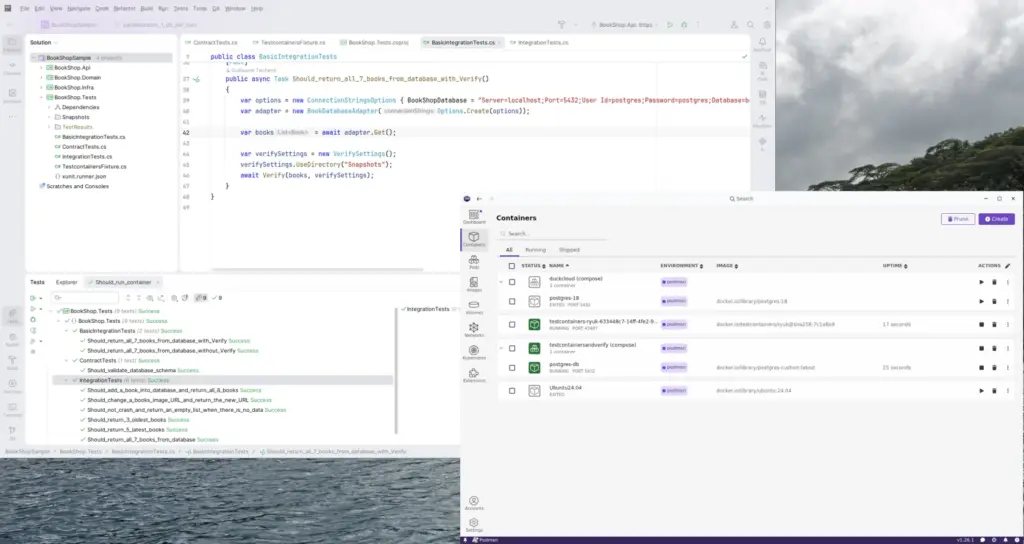
In order to develop using Universal Blue images such as Bazzite, it is usually recommended to install most tools in a dedicated container with DistroBox (and its GUI, DistroShelf). So I installed all my IDEs and dev tools in an Ubuntu container because it’s an OS I know and is generally well supported by IDE vendors. In my case, Jetbrains’ Rider.
Once Rider up and running, I can run it just like any other application without trouble : shortcuts on desktop or in the Start menu, same-ish loading time, hard drives access, etc… everything runs as usual.
Now to handle my dev containers such as a PostgreSQL database or a Redis instance, I use Podman Desktop. It runs in a dedicated sandbox with a file system access. When I run/debug my application from my IDE, it then can access the containers and everything is fine.
Testcontainers
However, from the tests side, I hit a wall. My tests use Testcontainers and I have a nice error stack when running them :
DotNet.Testcontainers.Builders.DockerUnavailableException
Docker is either not running or misconfigured. Please ensure that Docker is running and that the endpoint is properly configured.
You can customize your configuration using either the environment variables or the ~/.testcontainers.properties file.
For more information, visit: https://dotnet.testcontainers.org/custom_configuration/.
Besides using Podman or Docker, Testcontainers creates then destroys containers on-the-fly from the test runner. In my case, the test runner is launched from the IDE which itself runs into an Ubuntu container. I had therefore to grant the appropriate rights to everyone for my tests to be able to create and destroy containers inside Podman.
Procedure to follow
- First we want to find which socket Podman listens on. Let’s run the following command into a terminal of the host system (i.e. your Bazzite OS) :
echo $XDG_RUNTIME_DIR. Let’s just say it’s /run/user/1000. - As suggested by the error message, let’s create a .testcontainers.properties file in the home directory (e.g. /home/username). We will add the following 3 lines :
docker.host=unix:///run/user/1000/podman/podman.sock
docker.socket.override=/run/user/1000/podman/podman.sock
ryuk.container.privileged=false
The last line means that Ryuk — Testcontainers’ resource manager, whose goal is to clean up containers which could not have been destroyed cleanly (e.g. a test crashing a bit too hard) — should not run with root access rights. - If not already done, launch the podman service so that it does not need Podman Desktop running :
systemctl --user enable --now podman.socket - In a terminal window for the container that runs Rider (e.g. Ubuntu in my case), let’s check that the podman socket can be accessed :
ls -la /run/user/1000/podman/podman.sock - Run Rider and launch the tests using Testcontainers.
Conclusion
There you have it. The whole problem was making everyone play nice and communicate by telling explicitly which socket to use and to have Ryuk avoid trying to use root access. It’s not much but, after having had an unpleasant time searching Podman and Testcontainers documentations, I figured I’d make a short post about it. In case it helps someone.